Quick on-device app to digitize and restore family photo albums
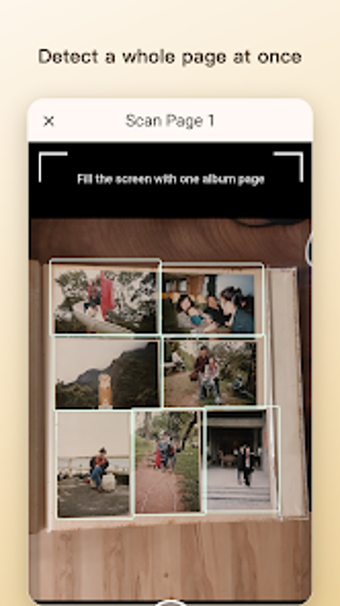
Photo Legacy, from UnityRoot Solutions Inc., is an Android app for digitizing physical photo albums quickly and privately. It captures whole album pages with a single photograph then uses on-device AI to detect, crop, restore, and export individual photos without uploading images off-device. Includes smart cropping, plus local-first privacy processing, and supports bilingual English and Traditional Chinese interfaces alongside dual Gregorian/ROC date options. Aimed at adult children, genealogy researchers, and privacy-conscious users converting family archives into organized digital collections.

Unlock your creativity with Adobe Stock
Get 10 images or 1 video with a free trial
How well does the app perform on typical devices?
Users report the app's on-device processing is fast because analysis and restoration occur locally, avoiding network delays. The installer is roughly 100 MB, the app runs on Android 7.0 and up, and UnityRoot recommends around 4 GB RAM for optimal performance. Those hardware details matter: lower-end devices can still use the app, but recommended hardware improves throughput when processing many album pages.
What export and restoration controls are available?
The app offers a small set of targeted restoration options rather than a full editing suite. Quick Restore provides four color styles: Original, Natural, Warm, and Vivid. Manual touch-up tools let you drag, resize, or draw missing photo boundaries if automatic cropping misses an image. Export produces individual photos from a single page capture, making it straightforward to assemble organized digital albums after batch capture.
Is it suitable for family-history and privacy-minded users?
The design explicitly targets family-archive workflows and privacy. The app keeps processing local by default, and there is an optional Help improve AI toggle that only uploads anonymized album-page images without face data or unique identifiers. Dual-calendar support (Gregorian and ROC) and Traditional Chinese language support address historical records and users in Taiwan, aligning the tool with genealogy and intergenerational sharing needs.
Is it better for beginners or advanced image editors?
The core workflow is approachable: photograph a page, review detected crops, and export refined images, so less technical users complete conversions quickly. What's more, manual adjustments are available for finer control; those require basic image-editing familiarity to get the best results. The app focuses on converting printed photos into files rather than providing advanced compositing or professional retouching features.
In conclusion, a focused digitization tool for archive-minded users
The app is a practical choice for adult children and researchers who need rapid, local conversion of physical albums into organized files while retaining privacy controls. It intentionally narrows scope to album digitization rather than full-scale photo editing, so users seeking advanced compositing or professional grading should pair it with a dedicated editor. For archive conversion and privacy-first processing, the app performs its intended role effectively.